UPS Remote Monitoring and Alarm Management: SNMP and Network Card

The worst way for a UPS to fail is for it to go unnoticed during an outage. The battery may be weak, the UPS may have switched to bypass mode, or the load may have increased; however, since no one is monitoring it, this is only discovered at the moment of the outage. Remote monitoring provides this information in advance and on an ongoing basis. In this article, we explain how to set up a monitoring infrastructure, what needs to be monitored, and how to manage alarms.
How Do You Track It?
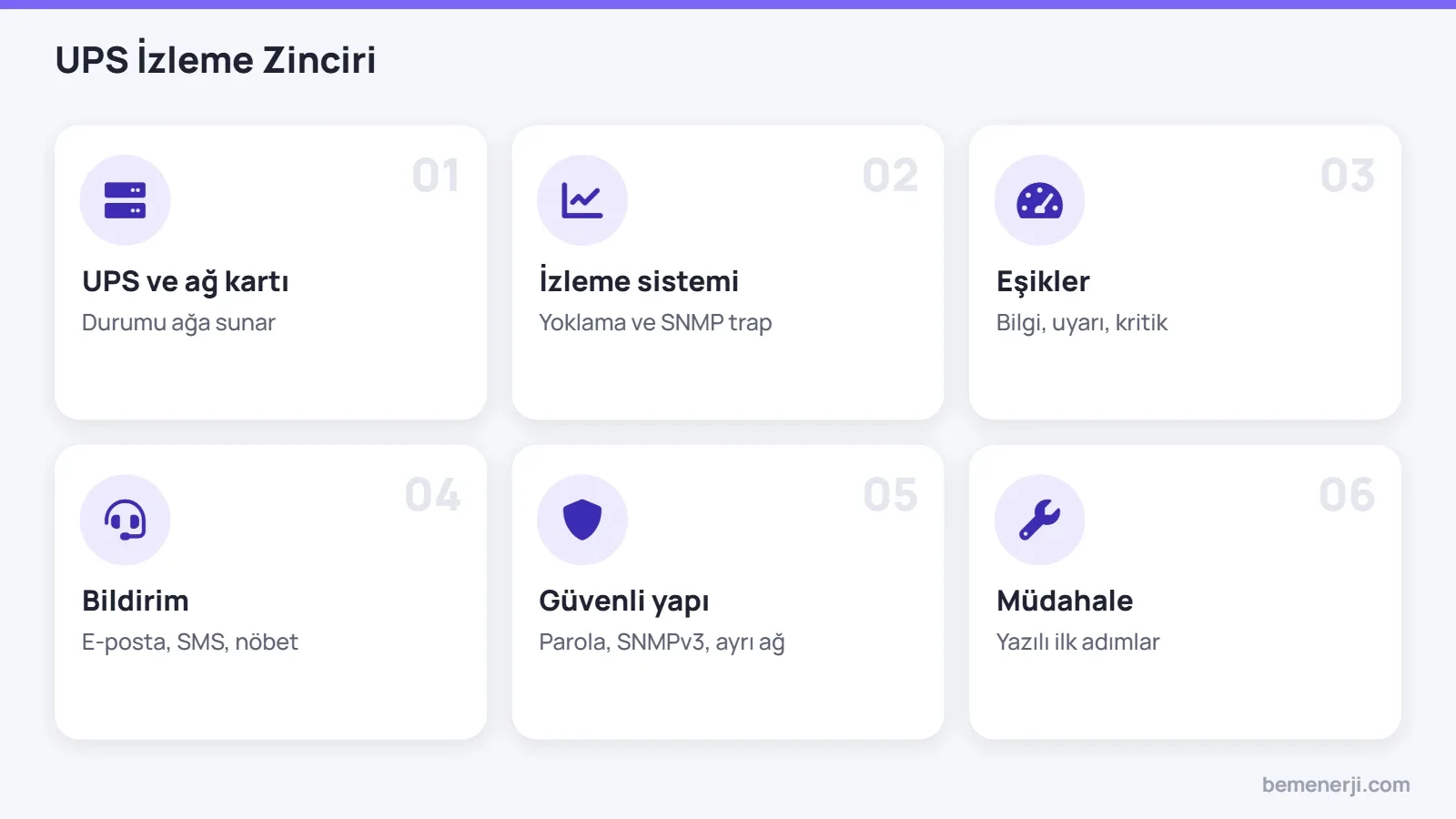
Most medium- and large-scale UPS units can accommodate a network management card (network interface card); in some models, this card is built into the unit. The card reports the UPS’s status over the network. Common communication methods include:
- SNMP: It is a standard protocol for monitoring network devices. There is a standardized management database for UPSs (RFC 1628); many manufacturers support this database or their own extension of it.
- Web interface: It allows you to view the status and adjust settings directly from the card's page.
- Email and SMS alerts: When an alarm is triggered, it sends a notification to the relevant parties.
- Serial or USB connection: It is used to allow a single computer to monitor a UPS and issue a shutdown command.
There are two operating modes in SNMP: the monitoring system queries the device at regular intervals (polling), or the device sends a notification (trap) on its own when an event occurs. Using both together is the most reliable approach; polling confirms that the device is accessible, while a trap reports an immediate event.
Which Metrics Should Be Tracked?
| Value | Why is it important? |
|---|---|
| Operating mode | Battery or bypass mode indicates a power grid issue and the UPS status |
| Input and output voltage | Network quality and connection status |
| Load percentage | Indicates a tendency toward overload |
| Battery status and remaining time | Adequacy of the reserve period |
| Battery temperature | Service Life and Overheating Warning |
| Alarm logs | Past events and recurring issues |
The meaning of alarm messages UPS alarm codes We explained this in our article. A steady increase in the load percentage is often a sign that a new device has been added; this topic UPS overload alarm We discussed this in our article.
Alarm Management: Too Many Alarms Are Also a Problem
Setting up monitoring is easy; the hard part is keeping alerts useful. If every minor incident triggers an alert, those responsible become desensitized to them and may miss a genuine warning. A well-configured alert system includes the following:
- Alarms are categorized by severity: informational, warning, critical.
- Thresholds are set realistically; for example, exceeding 80 percent of the load might trigger a warning, while exceeding 100 percent might be critical. Threshold values are determined based on the manufacturer’s recommendations and the company’s specific circumstances.
- Critical alerts are sent to the person who is actually available; the on-call schedule and backup personnel are designated.
- The initial response steps for recurring alarms are documented.
- By regularly reviewing the alarm history, recurring issues are resolved permanently.
Monitoring and automatic shutdown can work together: when the power goes out and the battery level drops to a critical level, the servers can be safely shut down (Automatically Shut Down Servers During a Power Outage).
Security of the Monitoring Infrastructure
A network-connected UPS is also a network device and presents an attack surface. Simple precautions can make a significant difference:
- Default usernames and passwords should be changed, and unused services should be disabled.
- If possible, SNMPv3 with authentication and encryption should be preferred; community strings in older versions should be unpredictable.
- UPS management interfaces should not be exposed to the public network; they should be kept on a separate management network.
- Software updates from the manufacturer should be monitored and applied.
Monitoring data also informs maintenance decisions; in multi-site facilities, this data with maintenance management are combined. To set up the monitoring system and integrate it with your maintenance plan, Periodic Battery and UPS Maintenance You can check out our page.
The Relationship Between Observation and Care
Monitoring does not replace field maintenance; it guides it. An increase in load percentage, a steady rise in battery temperature, or frequent bypass events indicate which areas should be inspected during the next maintenance visit. Thus, maintenance is not performed randomly but is data-driven. Monitoring logs are also valuable for establishing cause-and-effect relationships after a failure: the logs reveal what happened leading up to the event.
- IETF RFC 1628 — UPS Management Information Base (SNMP management database for UPS).
- IEC 62040-3 — Uninterruptible power systems (UPS) — Performance and test requirements (standard title).
Sources
Spot the Problem Before an Outage
The network management card continuously displays the UPS's mode, load percentage, battery status, and temperature. SNMP transmits this information to the central system.

Alarms categorized by severity, a shift schedule, and secure configuration monitoring make this process effective.
Frequently Asked Questions
01Can every UPS be monitored over the network?
02What is SNMP, and is it required?
03Who should receive the alerts?
04Does remote monitoring make maintenance unnecessary?
05Does monitoring compromise the UPS's security?
Let's Establish Monitoring and Maintenance Together
Integrating monitoring data with the maintenance plan ensures that issues are detected before they lead to outages. Maintenance Plans Check out our page, Contact Contact us through our website.