UPS in Residential and Smart Buildings: Building Automation, Floor Distribution, and Compatibility with Generators

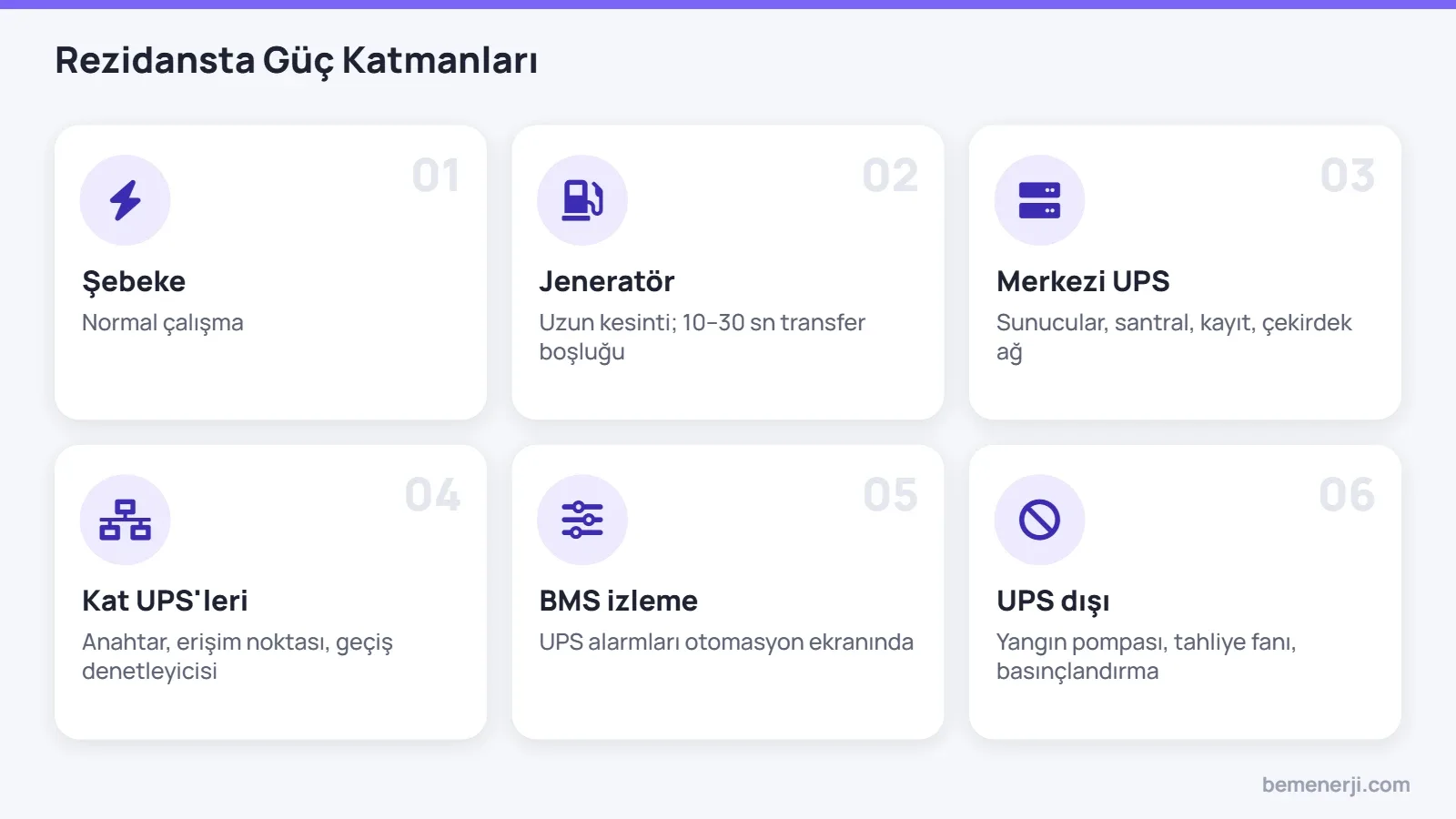
Generators are included from the outset in residential and smart building projects; therefore, the UPS is often put off until later with the reasoning that “there’s already a generator.” However, during the first 10–30 seconds of a power outage, the generator has not yet kicked in, and during this time, the building automation system restarts, card-access locks are disabled, floor lights go out, and camera recordings are interrupted. It takes minutes for the systems to recover once the generator comes online. This article explains how to integrate a UPS with a generator in residential and smart buildings. For ordinary apartment buildings and complexes, a simpler approach is UPS for apartment buildings and housing complexes You can find it in his article.
How Extensive Is "Low-Voltage" in a Smart Building?
While the equipment to be protected in a traditional building consists of just a few cameras and an intercom, the list is much longer in a smart building: the building management system (BMS) server and DDC panels, lighting and climate automation circuits, card-based access control and turnstiles, camera and recording servers, IP PBX and floor-level Wi-Fi, parking fee systems, fire detection interfaces, and elevator rescue systems. Each of these is located in a different place and has a different owner: some belong to building management, some to the security company, and some to the automation contractor.
The first step is to create this list and write two things next to each item: what we want to happen during a power outage (continue operating / shut down properly / stop) and its physical location. The UPS decision is based on this table—not on kVA.
We Have a Generator—So Why a UPS?
It takes some time for the generator to come online, become ready to carry the load, and for the transfer switch to switch over. In a well-maintained system, this time is measured in seconds; however, even a single second of downtime is unacceptable for electronic loads. The BMS server restarts, the card-based access controllers re-establish their network connections, and the log servers enter disk check mode. If the generator fails to start or runs out of fuel, this time there is nothing at all.
A UPS addresses these two issues: it bridges the transfer gap and provides enough time for critical systems to shut down properly if the generator fails to come online. While the generator is online, the UPS must also “accept” the generator; a UPS with a narrow input tolerance for frequency and voltage fluctuations may continuously reject the generator and remain on battery power. This relationship Differences Between a UPS and a Generator and The Effect of Harmonics on the Generator We have addressed this in our articles.
Centralized UPS or Zone-Based UPS?
In most data centers, the correct answer is both. A single online UPS for the servers, PBX, recording systems, and core network housed in the technical center; and small rack-mounted UPSs for switches, access controllers, and automation panels distributed across floors and remote locations.
| Load | Where? | Recommended Feeding Schedule |
|---|---|---|
| BMS server, registration servers, PBX, core switch | Technical Center / System Room | Centralized online UPS, typically in the 10–40 kVA range for most projects |
| Key cards, access points, access controllers | Floor-mounted low-voltage cabinets | 1–3 kVA rack-mounted UPS per cabinet |
| Automation DDC Panels | Mechanical floor, roof, boiler room | A small UPS or 24 V DC backup near the panel |
| Parking fees, booth | Entry/exit points | Local UPS (separate article) |
Running separate lines from the central UPS to all floors is often not practical due to cable costs and voltage drop. The disadvantage of floor-level UPSs, however, is the number of maintenance tasks involved: twenty small UPS units mean twenty battery banks. For this reason, floor-level UPS units should be selected from the same model and battery type, and all should be connected to the central monitoring system via a network card; the method UPS Remote Monitoring and Alarm Management We explained this in our article. For servers that require a redundant power supply, N+1 and 2N redundancy These options are also considered.
Time Target
In a building with a generator, 10–15 minutes is sufficient for a central UPS: this is enough to bridge the transfer gap and ensure a proper shutdown if the generator fails to come online. In buildings without a generator, or where the generator powers only fire protection systems, the target is extended to 30–60 minutes. Since the load on floor-level UPS systems is low, extending the runtime is cost-effective; however, if the central system has shut down, there is no point in the floor-level UPS running for an hour. The runtimes are adjusted relative to one another.
Battery Room or Cabin?
In residential settings, the battery bank for a central UPS is often housed in a cabinet next to the UPS; this is a reasonable solution for systems in the 20–40 kVA range. In larger systems, as the number of batteries increases, a separate battery room is required to accommodate ventilation, floor load, and maintenance access. It is essential that the battery cabinet be cooled by the technical center’s cooling system; if the UPS room operates at 30 °C, battery life is reduced to half of the expected duration. Considering the thermal design of the battery location during the project planning phase is one of the most commonly overlooked aspects during operation.
The BMS Should Also Monitor the UPS
The advantage of a smart building is that the monitoring infrastructure is already in place. If the UPS units’ network cards or dry-contact outputs are connected to the BMS, battery operation, battery failure, overload, and bypass conditions are displayed on the automation screen; no one has to go check the control room. If this connection is not specified from the outset in the project, adding it later will be both expensive and incomplete. Communication between the UPS and the servers is also established using the same infrastructure to ensure the servers shut down properly during an outage; auto-shutdown We explained this in our article.
Security Systems That Cannot Be Connected to a UPS
Fire pumps, sprinkler supply, smoke exhaust, and stairwell pressurization fans are not connected to the UPS; they have their own emergency power supply and generator circuit. The fire detection panel also comes with its own battery-backed power supply; the role of the UPS in this panel is Fire alarm systems and UPS We also discussed this in our article. As for elevators, the rescue system is a separate issue: elevator rescue systems.
Common Mistakes in Projects and Operations
- Connecting the UPS to the side of the transfer panel that is not connected to the generator; the UPS will not receive any power from the generator and will discharge during a prolonged outage.
- People install UPS units and then forget about them; no one knows how old the batteries are, so half of them won’t work during the first real power outage.
- UPS alarms are not forwarded to the BMS; as a result, a battery-operated alarm may go unnoticed for days.
- Failure to perform a power-off test on the UPS units during delivery and acceptance; installation and commissioning were considered complete.
- The technical center's air conditioning is not powered by the generator; the UPS works, but the servers shut down when the room gets too hot.
- Installing a UPS and batteries in a low-current cabinet without performing a heat calculation; battery life is cut in half.
What to check during commissioning Initial commissioning and acceptance tests You can find this in the article. Based on the number of annual visits required for the maintenance of a large number of small UPS units, maintenance plansWe have...
Generator and UPS Don't Do the Same Job
The generator takes care of the long outage, the UPS takes care of the first seconds and smooth shutdown. In the smart building, the two are planned together and connected to the BMS.

Central UPS technical center, floor UPSs protect remote points; they should all appear on the same monitoring screen.
Frequently Asked Questions
01If there's a generator, why do we need a UPS?
02Is a separate UPS required for building automation (BMS)?
03Are individual UPS units or a centralized UPS system the better choice?
04Could a UPS be incompatible with a generator?
05Are fire alarm systems connected to a UPS?
UPS Planning for Your Building Project
For residential and smart building projects, we plan the layout of central and floor-level UPS systems, their compatibility with generators, and their integration with the BMS—covering the entire process from installation to commissioning UPS Installation and Setup on our website. For the annual maintenance of a large number of devices maintenance planscan look at it, Contact You can contact us through this channel.