Automatically Shutting Down Servers During a Power Outage: Network Card and Monitoring Software

A UPS ensures that servers continue to operate during a power outage; however, the batteries will eventually run out. If the power outage lasts longer, there are two options: wait until the batteries run out and accept that the servers will shut down suddenly, or shut down the systems one by one in an orderly manner while there is still power in the batteries.
In this article, we explain how the second path is set up: how the UPS notifies the servers, when and in what order the shutdown begins, and what happens when power is restored.
Why Is It Necessary?
When the batteries run out, the UPS output is cut off and the servers shut down as if they had been unplugged. The consequences of this are often more costly than the outage itself:
- Data loss: Files currently being written and open transactions may be left incomplete; databases may become inconsistent.
- File system and disk issues: After an unexpected shutdown, a file system check may be necessary; in some cases, repair or restoration from a backup may be required.
- Long opening: The systems do not resume operation as soon as power is restored; they resume operation only after inspections and repairs are completed.
It is not possible to manage this risk manually at night or on weekends when no one is on duty. Therefore, a software program must make the decision to shut down based on information received from the UPS.
How Does the UPS Notify the Server?
| Link | How does it work? | Where applicable |
|---|---|---|
| USB or serial cable | The UPS connects directly to a computer; the software on that computer reads the battery status and initiates the shutdown. | A single server or a single computer |
| Network card | The card installed in the UPS broadcasts status information over the network, can be monitored via SNMP, and can send email alerts. | Multiple servers, virtualization environment, remote monitoring |
When a network card is used, a small monitoring software (agent) It is set up, or a central software server shuts down the servers one by one. The card also ensures that alerts are sent via email to the right people; how alerts are read UPS alarm codes We explained this in our article. The role of monitoring in UPS selection How to Choose a UPS We discussed this in our article.
When Does the Lockdown Begin?
The software initiates shutdown when one of the specified conditions is met. Common triggers include:
- Time elapsed during the battery test: If the power outage continues for a certain period of time after the UPS switches to battery power, the system will begin to shut down.
- Remaining time threshold: It begins when the remaining backup time calculated by the UPS falls below the specified value.
- Low battery alarm: It kicks in as a last resort when the UPS indicates that the batteries are running low.
There is no single correct answer for these values; is determined based on the situation. The decisive factor is the time required for all systems to shut down compared to the actual runtime of the batteries. Battery runtime decreases as they age; therefore, the thresholds are set with a margin, rather than based on new batteries. How the runtime is calculated How is battery life calculated? You can find it in his article.
Closing Order
Systems are interdependent; the wrong order can cause the shutdown itself to become problematic. The general principle is as follows:
- First, applications and virtual machines: Databases and business applications are shut down properly.
- Next, virtualization servers: After the virtual machines running on them shut down.
- Next, storage: Storage is not turned off while servers are using it.
- Network devices come last: Since shutdown commands are sent over the network, the switches are kept open as much as possible.
In a virtualization environment Also note: The software that manages the shutdown sometimes runs on a virtual machine on the server it is shutting down; the sequence is set up so that the system will not shut down until this software has finished its task. The shutdown times of virtual machines also vary and are factored into the total time. On the server room side, UPS Selection and Maintenance for the Server Room We explained this in our article.
What Happens When the Power Comes Back On?
Just as shutdown is planned in advance, so is startup. In many systems, the UPS can shut down its own output after the servers have shut down, following a specified delay; it restores power when the mains power returns. In some models, the system can be configured to wait until the batteries reach a certain charge level; this ensures that the systems will not be left without battery power during a second power outage that occurs immediately afterward.
To enable servers to start automatically, in the server settings (BIOS or management interface) Restore when power returns The option must be configured properly. The startup sequence is the reverse of the shutdown sequence: first the network and storage, then the servers, and finally the applications. How the systems will behave in situations such as a power restoration during shutdown also depends on the settings and should be verified during testing.
Configured During Installation, Verified Through Testing
Monitoring software, network cards, email alerts, and the sequential shutdown of servers are part of the UPS installation's commissioning tests. The other steps in the installation How to Set Up a UPS We explained this in our article. Once the settings are configured, the shutdown sequence is tested at a predetermined time; an untested shutdown scenario may not work during the first actual outage.
Over time, new servers are added, addresses and passwords change, and batteries wear out. That’s why the test regularly at scheduled times It is recommended to repeat the process and verify that email alerts are still reaching the correct recipients. Cases where the UPS did not activate at all during the outage are a separate issue; When the power goes out, the UPS doesn't kick in We discussed this in our article.
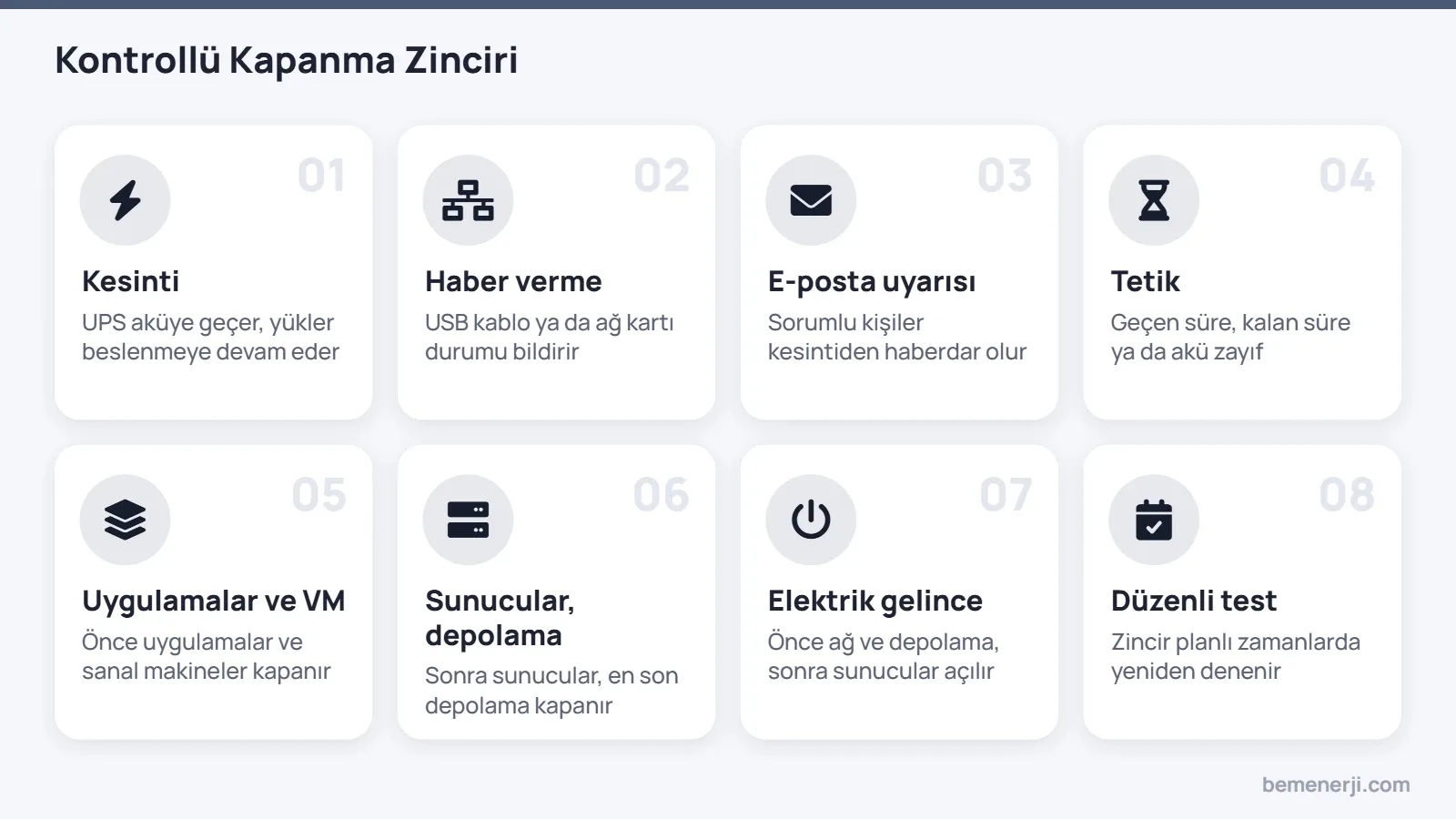
The Closure Chain at a Glance
Properly shutting down servers during a long outage involves a series of interconnected steps, from the detection of the outage to the restoration of power.

If a link in the chain is missing—for example, if an email is sent to the wrong address or a new server hasn’t been added to the list—the problem will become apparent during the first actual outage. That’s why the chain is tested during setup and regularly thereafter.
Frequently Asked Questions
01I have only one server—do I need a network card?
02How many minutes should the servers stay on before shutting down?
03We have a generator—is an automatic shut-off still necessary?
04Will the servers turn on automatically when the power comes back on?
05How often should we test the shutdown settings?
Let's Create Your Lockdown Scenario Together
We install and commission UPS and battery systems of all makes and models throughout Istanbul and the surrounding provinces; we also travel to distant cities for the installation of industrial systems. Monitoring software, network cards, email alerts, and the sequential shutdown of servers are configured and tested during commissioning; the process UPS Installation and Setup We explained this on our page. The brand and model of your UPS, the number of servers you have, and your environment Please let us know; let's evaluate it together.