Why Does a UPS Fail? Most Common UPS Failures

UPS units are devices that can operate trouble-free for many years; however, when they do fail, it often happens at the worst possible moment—during a power outage. The good news is that most UPS failures stem from a few known causes and often give advance warning.
In this article, we explain why UPSs fail, the most common failures and their symptoms, and what you should do first when a UPS triggers an alarm.
Main Causes of UPS Failures
- Battery problems: This is the most common cause of UPS failures. Batteries that are aging, overheating, or have been charged incorrectly cannot support the load during a power outage.
- Heat and inadequate ventilation: A hot environment causes rapid wear and tear on both batteries and electronic components.
- Overload: Connecting a load to the UPS that exceeds its capacity or is incompatible with it.
- Network-related issues: Sudden voltage spikes, frequent outages, and grounding issues.
- Aging components: Fans and capacitors eventually stop working properly.
- Dust and moisture: Dust that accumulates on the cards increases heat buildup, and moisture causes corrosion.
- Incorrect installation: Incorrect wire gauge, loose connections, missing grounding.
- Neglect: Failure to identify any of the above issues in a timely manner.
The Most Common UPS Failures and Their Symptoms
| Malfunction | Symptom | Possible cause |
|---|---|---|
| Battery failure | Immediate shutdown during a power outage, short backup time, battery alarm | Aged, overheated, or swollen batteries; loose connections |
| Overheating | Temperature alarm, fans running continuously at high speed, automatic switch to bypass mode | Hot environment, clogged filters, malfunctioning fan |
| Fan malfunction | Unusual noise, fan alarm, overheating | Worn fan bearing, dust buildup |
| Overload | Overload alarm, switch to bypass, or shutdown | Too many devices, high inrush current loads |
| Continuous bypass | Bypass warning or indicator light; the load is powered directly from the utility grid, not from the inverter | Inverter failure, overload, or overheating |
| Rectifier failure | The UPS running on battery power while the mains power is available; batteries not charging in models where the charger acts as a rectifier | Rectifier or input circuit failure |
| Inverter failure | Unable to switch to the battery during a power outage; no voltage at the output | Power module, board, or capacitor failure |
| Charging unit malfunction | Batteries not charging fully, battery voltage remaining low | Charging circuit malfunction |
| Communication problems | Unable to access the monitoring software; remote shutdown not working | Network card, cable, or configuration issues |
Several of these symptoms may occur together. For example, a malfunctioning fan can first cause overheating, which in turn can lead to premature battery wear and the UPS switching to bypass mode. Therefore, it is important to address the cause rather than the symptom.
If the UPS Is Operating in Continuous Bypass Mode
Bypass is a safety feature that routes the load directly to the utility grid when there is a problem with the UPS. Since the loads continue to receive power, everything may seem fine; however, during this time A UPS does not provide protection. When there is a power outage or a power surge on the grid, connected devices are directly affected. If the UPS remains in bypass mode for an extended period without a deliberately selected ECO (high-efficiency) mode, it must be inspected.
What Should You Do First When the UPS Sounds an Alarm?
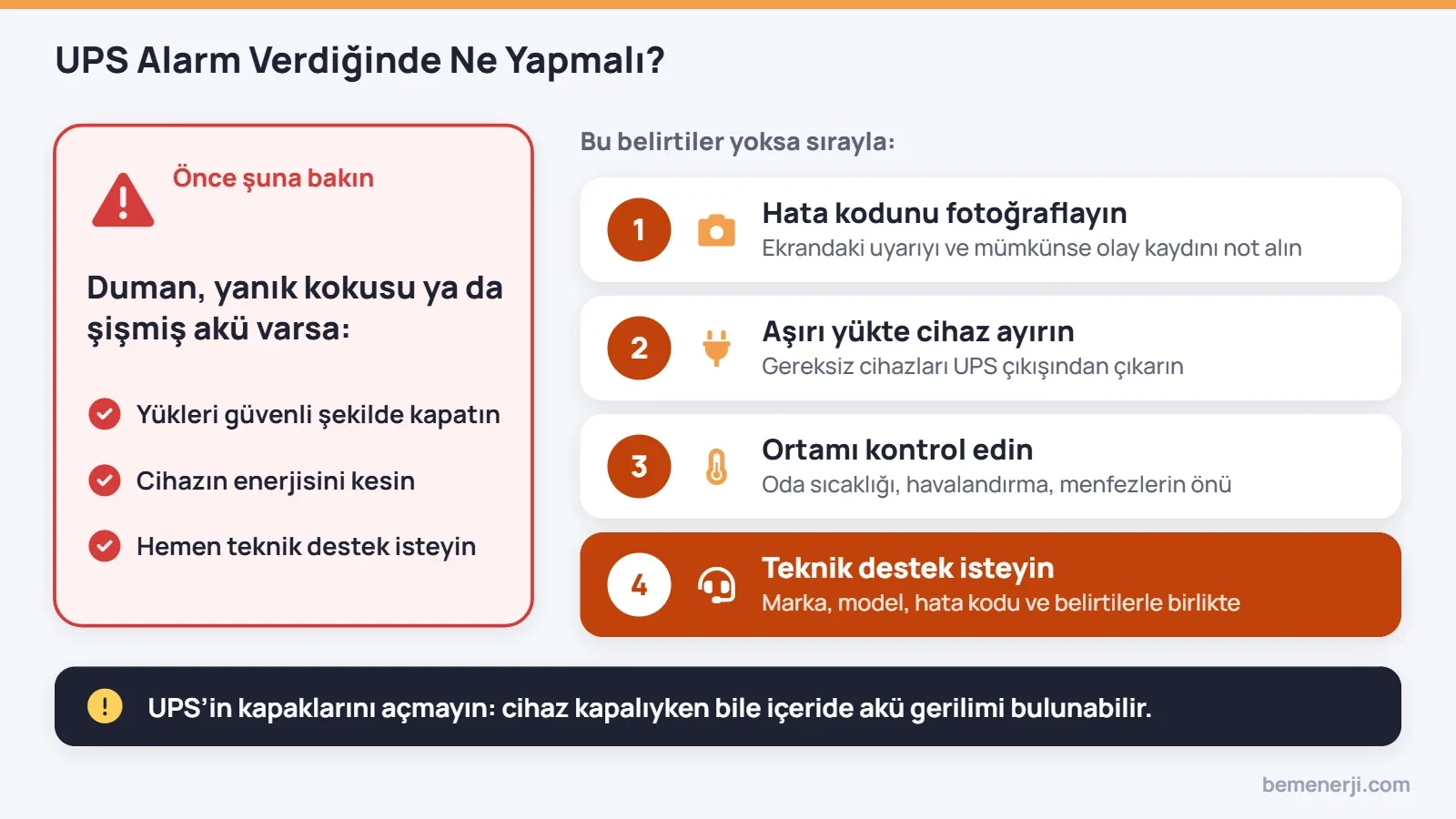
- Do not open the UPS covers. Even when the device is turned off, there may still be dangerous voltage inside due to the batteries.
- Take a photo of the error code or warning on the screen; if possible, make a note of the incident details.
- If an overload warning appears, disconnect any unnecessary devices from the UPS.
- Check the room temperature and ventilation.
- If there is smoke, a burning smell, or swelling of the batteries, safely disconnect the loads and turn off the power to the device.
- Please request technical support, providing the UPS brand and model, along with the error code and symptoms.
The error code and screenshot ensure that the service team arrives on-site prepared and with the correct part.
Can UPS Failures Be Prevented?
It is not possible to completely prevent malfunctions; however, most of them can be detected early:
- During routine maintenance, batteries are tested individually, and weak batteries are identified without any service interruption.
- Thermal camera inspection detects overheating connections before a failure occurs.
- The area where the UPS is located should be kept cool, well-ventilated, and dust-free.
- Only devices that require an uninterrupted power supply should be connected to the UPS.
- Fans and capacitors are replaced at the intervals recommended by the manufacturer.
What is checked during maintenance? What is UPS maintenance?, how to identify battery problems When should a UPS battery be replaced? We explained this in our articles.
Repair or a New UPS?
Whether a faulty UPS should be repaired or replaced is determined based on the device’s age, the availability of replacement parts, the cost of repair, and whether the load it powers has increased. For a relatively new unit with readily available replacement parts, repair is often the best option. However, for a very old UPS, one for which parts are no longer available, or one that can no longer handle the load, replacement may be more cost-effective. This decision should be made after the fault has been diagnosed, taking all costs into consideration.
What to do when a problem occurs and how the service process works In our UPS and Battery Technical Service Guide You can find it step by step.
- IEC 62040-1 — Uninterruptible Power Systems (UPS), Part 1: General and Safety Requirements
- IEEE Std 1188-2005 — Recommended Practice for the Maintenance, Testing, and Replacement of Valve-Regulated Lead-Acid (VRLA) Batteries for Stationary Applications
- ROHM — Service Life of Aluminum Electrolytic Capacitors (a decrease in lifespan as temperature increases)
- Product manuals and data sheets from UPS and battery manufacturers (specifications vary by manufacturer)
Sources
Quick Guide at the Time of Alarm
You can enlarge and save this image, which shows what to do at a glance at the time of the alarm, and hang it in the room where the UPS is located.

Frequently Asked Questions
01UPS beeps constantly, what does it mean?
02Why does the UPS immediately shut down when the power goes out?
03Is it dangerous for UPS to operate on bypass?
04Can I repair a UPS myself?
05Is fault detection paid?
Is Your UPS Malfunctioning?
We diagnose and repair UPS, inverters, rectifiers, generators and ATS systems of all brands and models. Repair is done on-site according to the condition of the malfunction, and if not possible, in our technical service workshop; repairs are guaranteed for 6 months and replaced parts are guaranteed for 24 months. For details Fault Detection and Technical Service page or enter the make, model and error code of your UPS. You can send us.