UPS for Supermarkets and Stores: Cash Registers, POS Systems, Barcode Scanners, and Cameras

In a supermarket, the cost of a power outage is measured in minutes, not hours: registers shut down, customers waiting in line leave their carts behind, and incomplete receipts become a data entry problem on the restarted device. The situation is no different in a store; even if the payment terminal runs on battery power, transactions cannot be processed once the internet goes down. In retail, the role of a UPS is simple but must be clearly defined: to buy enough time for sales to continue or for the store to close properly. This article explains the role of UPS systems in retail, from the workload at the checkout counter to the back office, and from refrigeration units to the operations of chain stores. For general information on small-business scale UPS for homes and small offices You can check out his article.
What Happens at the Grocery Store During a Power Outage?
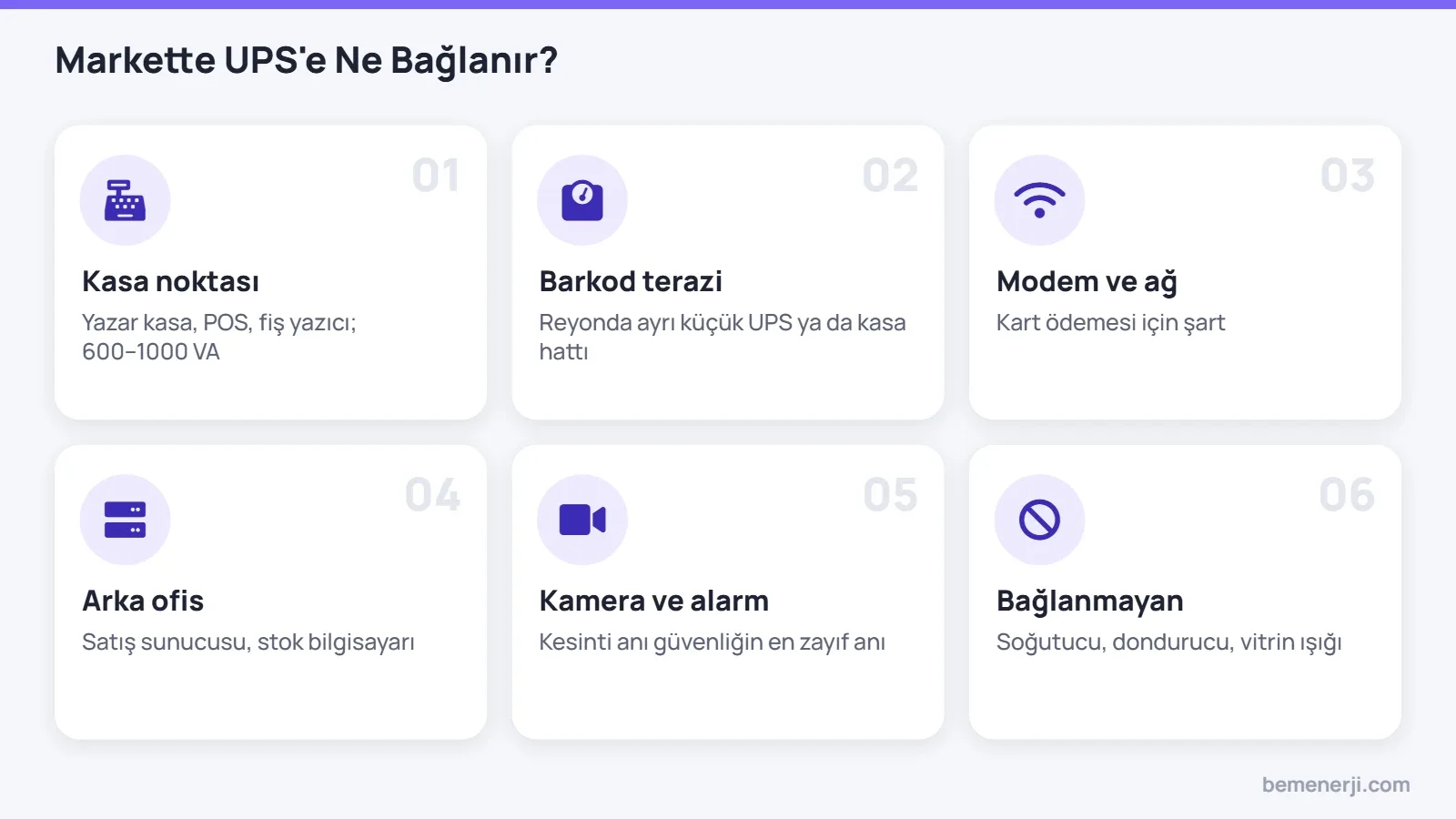
- Cash registers and POS systems: An open receipt remains incomplete; even if the transaction is recovered when the device restarts, both the cashier and the customer lose time, and there is a risk of discrepancies in the end-of-day report.
- Payment terminal: It has its own battery, but it is connected via the internet or the cash register; when the modem is turned off, payments cannot be accepted via the card.
- Barcode scale: Weigh-out items cannot be labeled; the produce and deli sections are closed.
- Camera and alarm: The moment of an outage is when security is at its weakest; the camera recording must continue.
- Coolers: It works—but it doesn't run on a UPS; temperature monitoring is a separate issue.
Cash Register Workload
| Device | Typical power | Note |
|---|---|---|
| Cash Register / POS Terminal | 15–40 W | It's important for it to close properly during a power outage |
| POS computer + monitor | 80–200 W | Point-of-sale software; touchscreen |
| Receipt printer | 10 W on standby, 50–150 W during printing | Peak current during thermal printing |
| Barcode scanner, customer display | 5–20 W | |
| Barcode scale | 20–50 W | The shelf scale may be located at a separate spot |
| Payment terminal charging unit | 5–15 W | It has its own battery |
The total power consumption of a single POS terminal is typically between 150 and 350 W; when the peak current of the receipt printer during printing is also taken into account, a line-interactive UPS rated at 600–1,000 VA per terminal is sufficient. A POS computer operates more smoothly with a pure sine wave output; in cheaper models with a modified sine wave output, some power supplies may make noise or overheat. The difference between UPS types Types of UPSs We explained this in our article.
A Separate UPS for Each Server, or a Single UPS for the Server Rack?
In a store with three or fewer registers, a small UPS per register is practical: it is placed under the register, so if it fails, only that register is affected, and it is easy to replace. As the number of registers increases, the situation changes; in a store with ten registers, this means ten separate UPS units, ten separate battery banks, and ten separate maintenance tasks. At this scale, powering the checkout lines from a single 3–6 kVA UPS and distributing power to the registers via separate circuit breakers from the UPS’s output panel is a more organized solution and more cost-effective in the long run. The decision depends on how the checkout counters’ electrical lines are routed; if the existing building does not have a separate circuit for the checkout counters, running a new circuit will affect the cost. Points to consider before installation technical survey We explained this in our article.
Back Office: Server, Modem, Camera
It’s not enough for the cash registers to be connected to the UPS if the back-office system isn’t. The sales software server, inventory computer, modem, router, camera recorder, and network switch are all links in the same chain: if the modem goes down, card payments stop; if the server goes down, the cash registers cannot access pricing and inventory information. A 1–2 kVA UPS in the back office supports this chain. The camera side UPS for cameras and recording devices In his article, the network cabinet UPS for network and communication systems We explained this in detail in our article.
Time Target
In retail, the goal is two-fold. During a short outage, sales should never stop: if power returns within a few minutes, the registers continue to operate, and the customer doesn’t even notice. During a long outage, however, time is needed to close open receipts, complete card payments, and shut down devices properly. A 15–30-minute window is sufficient for these two requirements. In areas with frequent outages or where the risk of an outage during closing hours is high, it makes more sense to consider a generator rather than extending this timeframe; having the UPS and generator share the load The Difference Between a UPS and a Generator You can find it in his article.
Cooling Units Are Not Connected to the UPS
The most common question from grocery store owners concerns display cases. A refrigeration compressor draws several times its rated power during startup and continues to consume energy for hours as the power outage drags on; relying on a UPS to cover this is disproportionate. Keeping the cabinets closed during a power outage, preventing the doors from opening, and allowing the products to remain protected by their own residual cold for a short time is a realistic solution; for a prolonged outage, a generator or power transfer is required. The role of the UPS here is to keep the temperature logger and alarm operational. This topic in all its aspects Cold Chain Tracking and UPS We discussed this in our article.
Standard in Chain Stores
In chains with dozens of branches, rather than making separate decisions for each branch, a standard package is established: the same UPS model per cash register, the same model in the back office, and the same battery type. This simplifies spare parts inventory, makes replacements easier, and ensures that the technical team encounters the same equipment at every branch. Monitoring the UPS units via their network cards from headquarters ensures that a battery failure is reported to headquarters before the branch manager even notices it. How to plan maintenance in a multi-branch structure UPS Maintenance Management for Multi-Site Operations We explained this in our article.
Maintenance: The Forgotten Device Under the Cabinet
In retail, most UPS units are forgotten the very day they’re installed. The device sitting under the cash register emits a beeping battery warning for years, but no one hears it in the crowd—or the sound is simply turned off. A simple annual check can prevent most problems: testing the battery (unplugging the unit and ensuring the register runs for a few minutes), cleaning the ventilation holes, and checking the battery’s age on the label. Batteries older than three years are replaced before the store enters its peak season; the cost of a power outage during holidays or sales periods far exceeds the price of the battery. In businesses with a large number of registers, since all batteries are installed on the same day, they all age at the same rate; replacements are planned in bulk. How to test a battery UPS Battery Test We explained this in our article.
Common Mistakes
- Connecting a refrigerator or freezer to the UPS; during the initial startup, the UPS goes into overload mode, and the units shut down.
- Selecting the smallest UPS without taking into account the peak current of the receipt printer during printing.
- Forgetting the modem while securing the cash registers; the cash register works, but card payments cannot be processed.
- Leaving the UPS under the desk, exposed to dust and foot traffic, will cause the ventilation holes to become clogged.
- If you don't replace the battery for 4–5 years, the UPS will last 30 seconds during the first power outage. The replacement time In this article We explained it.
- Connecting display lighting or a sign to a UPS is a waste of time.
We have a similar article for restaurants and cafes, but with a different kitchen workflow: UPS for restaurants and cafes. For your store's checkout and back-office layout UPS Installation and Setup You can access it from the page.
Chassis, network, and back office are protected together

Frequently Asked Questions
01How many VA of UPS capacity is needed for a cash register?
02Should a refrigerator or display case be connected to a UPS?
03Should I install a separate UPS for each server?
04Can I accept card payments during an outage?
05How many minutes should a UPS last?
Discovery for Your Store
Let’s work together to determine the right UPS configuration based on the number of your cash registers, your back office, and your electrical system; for on-site installation and maintenance in Istanbul and surrounding provinces Contact Us.